
AFFILIATE DISCLOSURE: This page contains affiliate links. We earn a commission if you make a purchase through these links, at no additional cost to you. This helps support our research. Learn more in our Affiliate Disclosure.
Looking for the best smart air purifiers on Amazon under $300? This guide compares five standout Wi-Fi options, whether you want a balanced smart purifier for most rooms, a large-room workhorse with strong Auto Mode, a quiet pick for bedrooms, a pet-friendly unit with a washable pre-filter, or a budget smart purifier that still gives you app control and voice support. We focused on real-world usability (useful Auto Mode, reliable app features, easy filter maintenance), clean-air performance for everyday pollutants, and simple setup so you can confidently pick the right purifier for your space.
Top 5 smart air purifiers under $300 on Amazon (quick picks)
- Best overall smart value: LEVOIT Core 400S-P Smart WiFi Air Purifier
- Best for large rooms (strong Auto Mode): WINIX AM90 Air Purifier (Wi-Fi)
- Best for bedrooms (quiet + sleek): BLUEAIR Blue Pure 311i Max
- Best for pets: LEVOIT Vital 200S-P (Washable Pre-Filter)
- Best budget smart pick: LEVOIT Core 200S-P Smart WiFi Air Purifier
The 5 best smart air purifiers under $300 on Amazon

Rating: 9.5/10 ⭐⭐⭐⭐⭐
Pros
✅ Best all-around smart pick: strong everyday filtration with a genuinely useful Auto Mode
✅ App features people actually use: schedules, remote control, filter-life tracking, and voice support
✅ Great for typical rooms (bedrooms, offices, living rooms) without jumping to expensive “pro” models
Cons
⚠️ Like most Wi-Fi devices, setup is smoothest on a 2.4GHz network
⚠️ Replacement filters are an ongoing cost (budget for them up front)
⚠️ On high speed it’s noticeable (Auto Mode helps keep it quiet most of the time)

Rating: 9.2/10 ⭐⭐⭐⭐⭐
Pros
✅ Strong large-room performance with a responsive Auto Mode and clear air-quality indicator
✅ Wi-Fi + app control for monitoring, settings, and filter reminders without walking to the unit
✅ Great “everyday odor helper” thanks to carbon filtration (cooking, pets, general funk)
Cons
⚠️ Like any high-airflow purifier, it gets loud on max speed
⚠️ App features are useful, but you may spend a few minutes dialing in your preferences
⚠️ If you want a super compact footprint, this one is more of a main-room unit
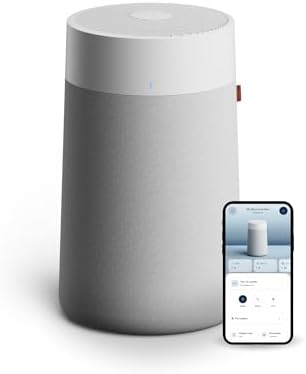
Rating: 9.0/10 ⭐⭐⭐⭐⭐
Pros
✅ Excellent bedroom pick: quiet on low speeds with strong cleaning power for its size
✅ Smart app experience that’s actually useful (Auto Mode, scheduling, filter tracking)
✅ Great everyday particle cleanup (dust, pollen, smoke) without feeling bulky
Cons
⚠️ If heavy odor removal is your main goal, look for units with more activated carbon
⚠️ Filters can cost more than basic non-smart purifiers over time
⚠️ Wi-Fi setup is easiest on a stable 2.4GHz network

Rating: 8.9/10 ⭐⭐⭐⭐☆
Pros
✅ Pet-friendly design: washable pre-filter helps catch fur and reduces clogging (great for shedding)
✅ Strong smart features: app control, schedules, and Auto Mode for hands-off daily cleanup
✅ Good balance for homes with pets: helps with hair, dust, and everyday odors
Cons
⚠️ Larger than compact bedroom units (measure your space)
⚠️ Auto Mode mainly reacts to particulates, not every odor/VOC scenario
⚠️ Filter replacements add ongoing cost, especially if you run it 24/7

Rating: 8.6/10 ⭐⭐⭐⭐☆
Pros
✅ Best budget way to get smart features: app control + schedules + voice support
✅ Perfect for small spaces (bedrooms, dorms, offices) where you want quiet, steady cleanup
✅ Simple and easy to live with: Sleep Mode and timers without overcomplicating things
Cons
⚠️ Not ideal for large rooms, size up if you need faster whole-room air turnover
⚠️ Fewer “premium” sensor features than higher-end smart purifiers
⚠️ You’ll still need to plan for replacement filters over time
How to choose the right smart air purifier
If you’re torn between a few options, focus on the five factors below. They usually make the right choice obvious for your room size, noise tolerance, and how hands-off you want the experience to be.
- Room size: Match the purifier to your actual room, and size up for open layouts or faster cleanup.
- Auto Mode quality: A good Auto Mode with a real air-quality sensor is what makes a purifier feel “smart” day to day.
- Filter setup: HEPA-style filtration is best for dust/pollen; carbon helps more with everyday odors. A washable pre-filter is a big bonus for pets.
- Noise at night: For bedrooms, prioritize a strong Sleep Mode and a unit that stays quiet on low speeds.
- Smart features you’ll use: App scheduling, filter-life tracking, and voice control are the most useful. Everything else is optional.
FAQ
Do smart air purifiers still work if Wi-Fi goes out?
Yes. The purifier will still run using the buttons on the unit. What you usually lose during an outage is remote control in the app, notifications, and voice assistant features until your connection is back.
How often do you need to replace the filter?
It depends on air quality, pets, and how many hours per day you run it. Check the filter monthly, clean any washable pre-filter if your model supports it, and replace the main filter when the filter-life indicator (or performance) suggests it’s time.
Are smart air purifiers loud?
Most are quiet on low or Sleep Mode and noticeably louder on high speeds (that’s normal because they’re moving more air). A good approach is to run higher speeds during the day, then let Auto Mode or Sleep Mode keep things quieter at night.
Affiliate note: As an affiliate, we may earn a commission if you buy through links on this page (at no extra cost to you).