
AFFILIATE DISCLOSURE: This page contains affiliate links. We earn a commission if you make a purchase through these links, at no additional cost to you. This helps support our research. Learn more in our Affiliate Disclosure.
Looking for the best smart locks on Amazon? This guide compares five standout options for keyless entry—whether you want Apple-friendly tap-to-unlock, a clean keypad lock for the whole family, fast fingerprint access, an easy retrofit that keeps your existing keys, or a budget Wi-Fi smart lock with great everyday features. We focused on real-world usability (quick entry, reliable auto-lock, guest access), security features that matter, and simple installation so you can confidently pick the right smart lock for your front door.
Top 5 smart locks on Amazon (quick picks)
- Best overall (Wi-Fi + Apple-friendly): Schlage Encode Plus Smart Wi-Fi Deadbolt
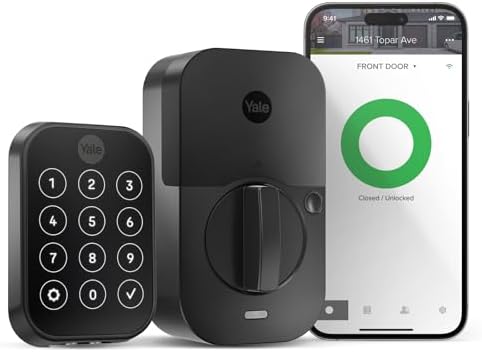
- Best keypad lock for families: Yale Assure Lock 2 (Wi-Fi) Keypad Deadbolt
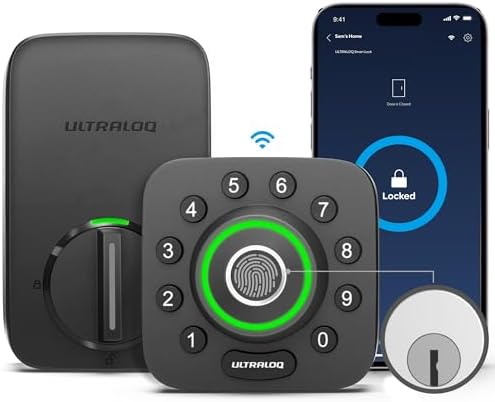
- Best fingerprint smart lock: ULTRALOQ U-Bolt Pro WiFi (Door Sensor)
- Best retrofit (keep your existing keys): August Wi-Fi Smart Lock (4th Gen)
- Best budget Wi-Fi pick: Wyze Lock Bolt v2 (Fingerprint + Keypad)
The 5 best smart locks on Amazon

Rating: 9.6/10 ⭐⭐⭐⭐⭐
Pros
✅ Built-in Wi-Fi + Schlage Home app (remote lock/unlock, lock history, notifications)
✅ Apple HomeKit + Apple Home Keys for tap-to-unlock with iPhone/Apple Watch
✅ Strong security features: encrypted connection, built-in alarm, BHMA top residential ratings
Cons
⚠️ Usually costs more than most Wi-Fi smart locks
⚠️ Touchscreen + Wi-Fi can drain batteries faster than basic keypad locks
⚠️ Apple Home Keys is best if you already use iPhone/Apple Watch daily
Rating: 9.1/10 ⭐⭐⭐⭐⭐
Pros
✅ Easy for households: keypad codes, app control, optional Auto-Unlock, and voice assistant support
✅ Auto-Lock with DoorSense-style door-closed detection (great if you forget to lock up)
✅ Great guest access setup: share unlimited entry codes and track activity in the app
Cons
⚠️ This version is keypad (not fingerprint)
⚠️ Some Apple Home features require an Apple hub for remote access
⚠️ Listing notes it is intended for use in the US/Canada only
Rating: 9.0/10 ⭐⭐⭐⭐⭐
Pros
✅ Super flexible entry: fingerprint + keypad + app + auto unlock/lock + 2 mechanical keys
✅ Built-in Wi-Fi (no hub) for remote control, access sharing, and entry logs
✅ Rugged specs: ANSI Grade 1 + IP65 weatherproof rating (great for exposed doors)
Cons
⚠️ Wi-Fi is 2.4GHz only (check your router settings)
⚠️ More features = more setup (take time to dial in auto-lock and notifications)
⚠️ Round keypad layout is love-it-or-hate-it compared to standard touchscreen pads

Rating: 8.8/10 ⭐⭐⭐⭐☆
Pros
✅ Easiest upgrade: installs on the inside of your door and keeps your existing deadbolt + keys
✅ Built-in Wi-Fi for remote lock/unlock, guest access, and door status in the August app
✅ Great for aesthetics: no big exterior keypad if you prefer a clean front-door look
Cons
⚠️ It is a retrofit, so you need a compatible existing single-cylinder deadbolt
⚠️ If you want keypad codes, the keypad accessory is typically sold separately
⚠️ Motorized turn can be a bit slower/louder than some full deadbolt replacements

Rating: 8.6/10 ⭐⭐⭐⭐☆
Pros
✅ Budget-friendly Wi-Fi smart lock with fast fingerprint unlock and an anti-peep keypad
✅ Strong everyday backups: physical keys + USB-C emergency power + auto-lock timer
✅ Weather-ready for the price: BHMA Grade 2 + IP53 rating + tamper alarm features
Cons
⚠️ Not a top-tier security grade (BHMA Grade 2 vs Grade 1)
⚠️ Smart features depend on Wi-Fi/app stability (router placement matters)
⚠️ If you want Apple HomeKit/Thread/Matter-style setups, this is not the ecosystem-focused pick
How to choose the right smart lock
If you’re torn between a few options, focus on the 5 factors below. They’ll usually make the “right” lock obvious for your specific door and household.
- Lock type: Full deadbolt replacement (most picks here) vs. retrofit (August installs inside and keeps your existing keys).
- How you want to unlock: keypad codes (great for guests), fingerprint (fastest), phone/app, or a physical key backup.
- Connectivity: Built-in Wi-Fi is simplest for remote control, but it can use more battery than Bluetooth-only locks.
- Auto-lock & door status: Features like door-closed sensing and auto-lock reduce “did I lock the door?” anxiety.
- Weather & durability: If your lock is exposed to sun/rain, look for IP ratings and stronger security grades.
FAQ
What happens if the batteries die?
Most smart locks include at least one backup method (physical key, emergency power port, or both). If you live somewhere with cold winters, it’s smart to replace batteries on a schedule rather than waiting for a low-battery warning.
Do smart locks work during Wi-Fi outages?
Yes—local unlocking methods (keypad, fingerprint, physical key) still work. What you usually lose during an outage is remote control from your phone when you’re away from home.
Are smart locks hard to install?
Most are DIY-friendly with a screwdriver. The main “gotcha” is door compatibility (backset, thickness, and whether your existing deadbolt is standard). If you want the least invasive install, a retrofit lock like August is typically the fastest.
Affiliate note: As an affiliate, we may earn a commission if you buy through links on this page (at no extra cost to you).