
AFFILIATE DISCLOSURE: This page contains affiliate links. We earn a commission if you make a purchase through these links, at no additional cost to you. This helps support our research. Learn more in our Affiliate Disclosure.
Looking for the best HomeKit smart plugs on Amazon? This guide compares five standout picks across different use cases — a Matter-over-Thread flagship for rock-solid Home-app reliability, a dead-simple budget 4-pack, the default outdoor plug, a triple-outlet power strip with per-outlet energy monitoring, and a Matter-based cross-ecosystem alternative. We focused on real-world decision factors: native HomeKit or Matter setup, Thread vs Wi-Fi connectivity, compact form factor, power metering, and UL certification.
The 5 Best HomeKit Smart Plugs on Amazon

Rating: 9.5/10 ⭐⭐⭐⭐⭐
Pros
✅ Best overall HomeKit pick: Matter-over-Thread means rock-solid Home app reliability with no Wi-Fi clutter
✅ Built-in per-outlet energy metering (live watts + cumulative kWh) surfaces directly in the Home app
✅ Setup is a single Matter QR code scan — no manufacturer app required
Cons
⚠️ Pricier than basic Wi-Fi plugs — not ideal if you need five or more around the house
⚠️ Needs a HomePod mini or Apple TV 4K acting as a Thread border router for full functionality
⚠️ Type-B (North American) plug only — EU buyers need the regional SKU
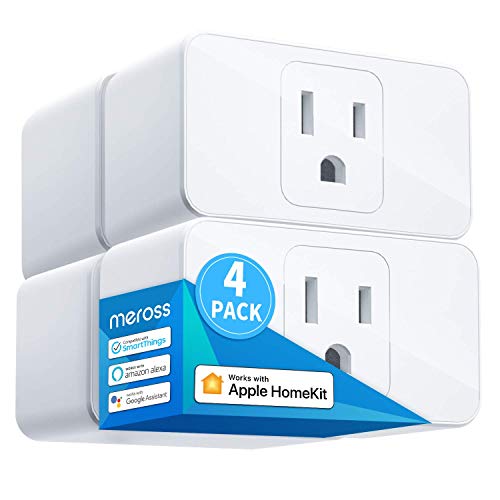
Rating: 9.0/10 ⭐⭐⭐⭐⭐
Pros
✅ Best budget pick: the cheapest way to add several HomeKit plugs at once (4-pack pricing)
✅ Native Apple Home setup — pair with a QR code, no Meross account required
✅ Mini form factor leaves the neighboring outlet on a duplex receptacle usable
Cons
⚠️ Wi-Fi only (2.4 GHz) — adds clients to your router if you buy several
⚠️ No energy monitoring
⚠️ Firmware updates run through the Meross app, which you’ll likely install once then delete
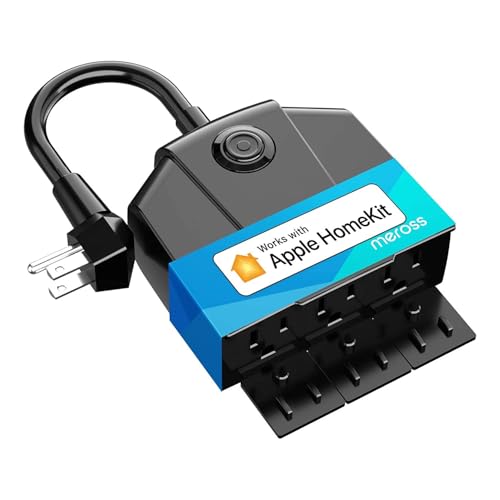
Rating: 8.8/10 ⭐⭐⭐⭐⭐
Pros
✅ Best outdoor HomeKit plug: three independently controlled outlets for string lights, fountains, holiday décor
✅ IP44 weather rating holds up to rain and splashes through a typical winter
✅ Long cord lets you hide the unit behind a bush and keep the outlets accessible
Cons
⚠️ IP44 protects against splashes, not submersion — bring it in for a hard freeze or sustained downpour
⚠️ 2.4 GHz Wi-Fi only, so outdoor signal strength matters
⚠️ Larger footprint than indoor plugs — intentional, but worth noting

Rating: 9.2/10 ⭐⭐⭐⭐⭐
Pros
✅ Best for energy monitoring: each of three outlets is individually controlled AND individually metered in the Home app
✅ Built-in surge + overvoltage + overcurrent protection
✅ Matter-over-Thread, so no extra Wi-Fi clients and fast response times
Cons
⚠️ Expensive for a single power strip
⚠️ Requires a Thread border router (HomePod mini / Apple TV 4K)
⚠️ Overkill if you just want to automate a single lamp

Rating: 8.6/10 ⭐⭐⭐⭐☆
Pros
✅ Best cross-platform pick: Matter-over-Wi-Fi means it speaks HomeKit, Google Home, Alexa, and SmartThings
✅ Compact single-outlet design doesn’t block the sister outlet
✅ Often the cheapest per-plug HomeKit option when bought as a 3-pack
Cons
⚠️ Wi-Fi only (2.4 GHz) — no Thread
⚠️ No energy monitoring on this SKU
⚠️ Pairing through Matter still requires scanning a code from the packaging — save it
How to Choose the Right HomeKit Smart Plug
- Prefer Matter over proprietary Wi-Fi. Matter plugs show up natively in the Home app and stay working if you ever switch to Google Home or Alexa — no ecosystem lock-in.
- Thread beats Wi-Fi for reliability. Thread plugs don’t add clients to your router, reconnect faster after power cycles, and usually have lower latency in the Home app. You need a HomePod mini or Apple TV 4K as a Thread border router.
- Check the form factor. Fat plugs block the second outlet on a duplex receptacle. Look for “mini” designs if you plan to use both outlets.
- Decide whether you need power metering. Energy monitoring is invaluable for tracking phantom loads, but adds cost. If you just want to turn lamps on and off, skip it.
- Verify UL or ETL certification. Non-negotiable for anything carrying more than a light load. Skip plugs that only cite “CE” or unverifiable safety logos.
HomeKit Smart Plug FAQ
Do I need a HomeKit hub? For local control on your home Wi-Fi, no — any iPhone or iPad can pair a HomeKit plug. For remote access away from home, and for any Matter-over-Thread plug, you need a HomePod, HomePod mini, or Apple TV 4K acting as the home hub. Most people already have one.
What about Kasa, Wemo, or older TP-Link plugs? Some newer Kasa and Tapo models support HomeKit through Matter firmware, but legacy Wi-Fi-only Kasa plugs (like the HS105 and HS100) do not. If a plug is listed as HomeKit-compatible, verify the exact model number against TP-Link’s Matter support list before buying.
Is it safe to use a smart plug for a space heater or window AC? Check the plug’s maximum continuous amperage rating against the appliance’s draw. Most smart plugs are rated for 15A, and a 1500W space heater will use most of that. Running at the edge of a plug’s rating on a long duty cycle is where cheap plugs fail — stick to name-brand, UL-listed plugs for high-draw appliances and check the spec sheet first.